4. Training and Validation: Your First QLoRA Run
Chapter at a glance
- What this chapter does: run the Notebook cell by cell: see how the base model answers → add LoRA → train 72 steps → look at the loss curve → save, reload, compare answers → merge into a full model
- What you need: everything in chapter 3 passed: the
.venv-trainself-check, base model verification, and the Notebook running on the LoRA · Python 3.11 kernel - What you end up with: under
runs/science-001/, the adapter, the loss curve, a before/after answer comparison, andmerged-model/ - Rough time: training itself takes from ten-odd to several tens of minutes (measure it yourself); with loading, generation and merging, the whole Notebook takes about 1 hour
This chapter uses the GPU Notebook as the main entry point. LoraConfig, SFTConfig, SFTTrainer, trainer.train() and the save/reload code appear directly in the cells; the expected output of each cell and the parameter-by-parameter explanations are in the Notebook. This chapter covers the big picture: what each step does, how the training loop works inside, where the VRAM goes, where the artifacts end up, and how to read the results. The command-line version, train.py, is used for resume from checkpoint in section 4.6 and for the comparison experiments in chapter 6.
4.1 What Each Step Does
| Notebook step | What runs | What you should check |
|---|---|---|
| 1–2 | Check the kernel, read dataset.json, build training/validation samples in memory, compute the step count | Python comes from .venv-train; 1150 train and 115 val samples; 72 planned steps |
| 3–4 | Load the base model in NF4 and generate answers to three fixed questions | Note the VRAM at this point; you can see the base model's answers |
| 5–6 | Add LoRA, configure TRL, inspect the actual labels |
About 33 million trainable parameters (about 0.8%), all of them LoRA |
| 7 | trainer.train(), then plot the loss curve |
Progress reaches 72/72; training loss goes down overall; the trend of the validation loss |
| 8 | Confirm the parameters were updated and save the adapter | The completion record, weights, config and training state have all been written |
| 9–10 | Release the training objects, reload the adapter from disk, compare answers again | The answer style has changed; judge by hand whether it's better |
| 11 | Merge in BF16 from the unquantized base model, reload the full model and generate | merged-model/ loads on its own |
| 12–13 | Deploy vLLM from the GPU terminal, call it locally | Run in a terminal; see chapter 5 |
The three questions before and after training use the same role prompt, facts, NF4 precision and greedy decoding, so you can compare the effect of the weight changes.
What happens inside trainer.train()
Cell 7 is a single line, trainer.train(), but it ties together every concept from chapter 1. One step goes like this:
重复 16 次(梯度累积):
    取 1 条样本的 input_ids(约 400 个 Token)
    前向:NF4 基座临时还原成 BF16 参与计算,LoRA 的 A、B 叠加在 7 类线性层上
          → 每个位置输出“下一个 Token”的概率
    loss:只在 completion_mask = 1 的位置(参考回答 + EOS)比较预测和答案
    反向:算梯度,但只算到 LoRA 的 A、B 上;基座参数冻结,没有梯度
          → 梯度累加起来,不立刻更新
AdamW 按累加的梯度更新 LoRA 参数一次(学习率按 warmup + cosine 变化)
step + 1;每 12 步在 115 条 val 样本上只做前向、算一次验证 loss;每 25 步存一次检查点
In English: repeat 16 times (gradient accumulation): take one sample's input_ids (about 400 tokens); forward pass, with the NF4 base temporarily dequantized to BF16 for computation and LoRA's A and B added on top of 7 kinds of linear layers, so each position outputs a probability for "the next token"; loss compares prediction and answer only where completion_mask = 1 (the reference answer + EOS); backward pass computes gradients only down to LoRA's A and B (the base parameters are frozen and get no gradient), and the gradients are accumulated rather than applied immediately. Then AdamW updates the LoRA parameters once with the accumulated gradients (learning rate follows warmup + cosine). Step + 1; every 12 steps, run a forward-only pass over the 115 val samples to compute the validation loss; every 25 steps, save a checkpoint.
After 72 steps, each of the 1150 samples has been seen exactly once (1 epoch). Throughout the whole process not a single one of the 4 billion base parameters changes; only about 33 million LoRA parameters do, which is why cell 8 specifically checks that "the LoRA tensors really changed".
4.2 Why These Settings
| Setting | Current value | Reason |
|---|---|---|
| Base model | Qwen3-4B-Instruct-2507, pinned revision | A fixed point of comparison |
| Training method | NF4 + BF16 compute + LoRA | Updates only a small number of parameters on a single 24 GB GPU |
| LoRA | rank 16, alpha 32, dropout 0.05 | A common starting point for practice |
| Target layers | q/k/v/o and gate/up/down projections | Covers the attention and feed-forward projections |
| Micro-batch / accumulation | 1 / 16 | Only one sample in VRAM at a time; accumulate 16 before each update |
| Optimizer / learning rate | AdamW / 1e-4 | Paired with a short warmup and a cosine schedule |
| Length / concatenation | 4096 / no packing | Never silently truncates targets, and keeps the supervision range easy to inspect |
| Amount of training | 1 epoch ≈ 72 steps | Every training sample is seen once and the before/after difference is visible; to just test the pipeline, change it to 10 |
| Validation | Validation loss every 12 steps | Uses topics that were not trained on to watch for overfitting |
What each config parameter means, why it has this value, and what happens if you change it are covered in the tables under the corresponding Notebook code cells (steps 3, 5 and 6), so they are not repeated here.
4.3 Watching the GPU During Training: Where the VRAM Goes
Before training starts, open a second GPU terminal:
It prints one line every 2 seconds. Compare how the numbers change against the estimates below:
| Usage | Estimate | When it appears |
|---|---|---|
| CUDA context | About 0.5 GB | The first time the kernel uses the GPU |
| NF4 base weights | About 2.5–3 GB (4B × 0.5 bytes; a few layers such as the word embeddings stay in BF16) | After the model is loaded in step 3 |
| LoRA parameters + gradients + AdamW state | 33 million parameters × about 16 bytes ≈ 0.5 GB | Steps 5–7 |
| Activations | Vary with sample length; gradient checkpointing keeps them fairly small | During training, in each sample's forward/backward pass |
The longest sample in this dataset is about 550 tokens, so peak VRAM is usually far below 24 GB. After training, training-complete.json records PyTorch's peak_allocated_gib and peak_reserved_gib; the nvidia-smi numbers are somewhat larger because they also include the CUDA context and the caching pool. GPU utilization should stay fairly high during training; if it stays low for long, the bottleneck may be data loading or the CPU.
Don't use the VRAM of this batch of short samples to infer the cost of 4096-token samples. If you hit OOM, first shut down other kernels, then check sample lengths; if you really need to lower the limit, rewrite the overlong samples rather than cutting off the reference answers.
4.4 Where to Confirm That Training Has Finished
If the project is at /root/llm-lora-tutorial, the default artifacts are in the locations below; for a project on the data disk, go by the absolute path the Notebook prints:
/root/llm-lora-tutorial/runs/science-001/
├── training-complete.json       # steps, loss, number of changed parameters, run time, peak VRAM, adapter fingerprint
├── trainer_state.json          # training log and global_step
├── manifest.json               # base model version, data fingerprint, training config
├── dataset.json                # copy of the data actually read in this run; don't edit it day to day
├── loss-curve.png              # training/validation loss curve
├── adapter/
│   ├── adapter_model.safetensors   # LoRA weights, about 130 MB
│   ├── adapter_config.json
│   └── manifest.json
├── checkpoint-50/              # training checkpoint (includes optimizer state, training can resume from it)
├── checkpoint-72/
├── before-answers.json
├── answer-review.json           # before/after answers and the review to fill in
├── inference-check.json         # the reloaded adapter can generate
├── merged-model/                # full BF16 model, about 8 GB
└── merged-inference-check.json
training-complete.json only exists once step 8 finishes. You should see final_step=expected_steps=72, a finite loss, changed_lora_tensors>0, and the adapter's two core files non-empty. Note that the adapter is only about 130 MB while the merged full model is about 8 GB: that's where LoRA saves storage.
4.5 Read the Loss Curve, Then Compare Answers
How to read loss-curve.png: training loss going down overall means the model is fitting the reference answers; validation loss going down at the same time means this way of answering also works on topics it hasn't seen; training loss still going down while validation loss starts rising is overfitting. If neither line moves, check the learning rate, the trainable parameters and the mask first.
The figure below is a real curve from running one full epoch with this chapter's default configuration on an RTX 4090 (24 GB) on 2026-10-11; it took about 26 minutes:
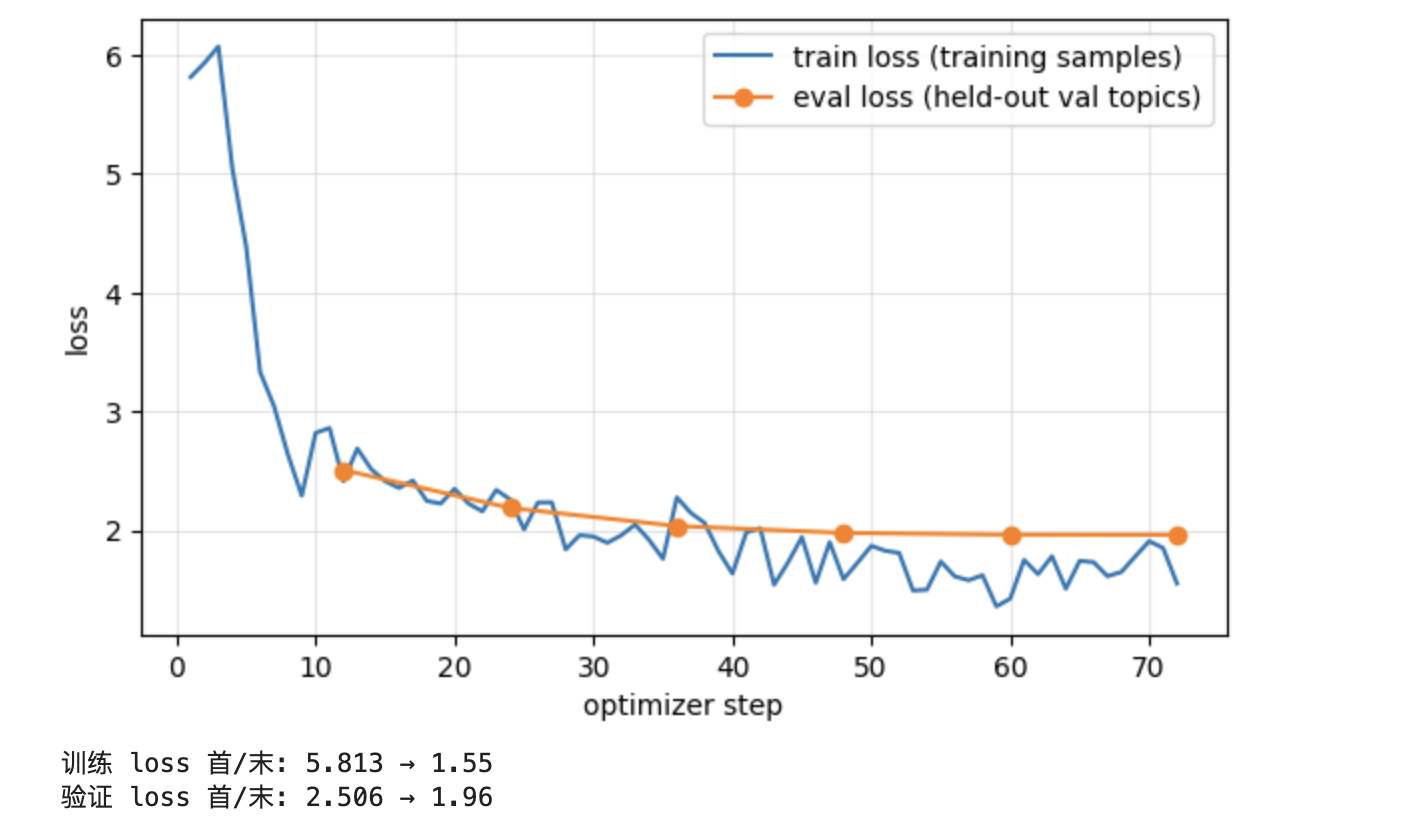
| Step | 12 | 24 | 36 | 48 | 60 | 72 |
|---|---|---|---|---|---|---|
| Validation loss | 2.51 | 2.19 | 2.03 | 1.98 | 1.96 | 1.96 |
Reading this curve section by section:
- First 10 steps: training loss plunges from about 6 to around 2.5. The way the base model is used to talking is very different from these short, conversational reference answers, so at first it is very "surprised"; LoRA learns the format and tone first. During the first few steps the learning rate is still warming up, which is why steps 1–3 barely go down.
- Steps 10–48: both lines slowly go down together. This is the phase where it really learns "how to say it". The validation loss is going down too, which means what it learned also applies to the 5 topics it hasn't seen.
- After step 48: validation loss levels off at 1.96. One epoch has basically learned as much as it can; training longer probably wouldn't do any better on the validation set.
- Ignore the jagged blue line. Each point is just the average of one step's 16 samples, so it jumps when it hits an easy or hard batch; look at the overall trend.
- The blue line ending slightly below the orange line (about 1.5 vs 1.96) is normal. The validation set covers topics it hasn't seen, and the answers contain a lot of topic-specific content; learning only the speaking style can't push that part down.
Compare an abnormal curve: if you run the training cell again without restarting the kernel, it keeps training the already trained model, which amounts to training for several extra epochs. It then looks like this: training loss gets pushed down to around 0.5, while validation loss climbs back up from 2.0 to 2.3. The training set keeps getting better while the validation set keeps getting worse: that is overfitting by memorizing the training data. Before retraining, always do Kernel → Restart Kernel first, then run again from cell 1.
Step 9 recreates the base model and loads the adapter from disk; step 10 prints the answers before and after training. After 1 epoch you will usually see the answers get shorter and structured more like the training data. Open answer-review.json and judge each question: are the facts correct, does it follow requirements like “一句话” (“one sentence”) and “不追问” (“no follow-up questions”), is the Chinese right for the grade band, are the exploration suggestions concrete and safe; then fill in which answer you prefer and why.
The three observation questions come from training topics, so they only show "what style it learned". To answer "is LoRA better than the base model with a good prompt", use the validation-set blind review in chapter 6.
4.6 Reruns, Small-Sample Overfitting, and Resume from Checkpoint
To retrain from scratch, restart the kernel, change RUN_DIR to a new directory such as runs/science-002, and run the cells one by one again. Keep the old directory. The save cell can be used to check the logs, but don't casually rerun trainer.train() after training has finished.
The two exercises below are not in the Notebook; they use the command-line scripts.
First, know this: the command-line scripts read a "snapshot". The Notebook reads dataset.json directly; the command-line scripts (this section, section 5.2 and chapter 6) read a read-only snapshot generated by lab.prepare. A database analogy: dataset.json is the editable source table, and the snapshot is a read-only export with checksums that every experiment result can be traced back to. The snapshot records fingerprints of the data, the tokenizer and the prompt code; if any of them changes, later commands refuse to use the old snapshot instead of quietly mixing them. The snapshot directory contains the train/val/test conversations, facts.jsonl, fewshots.json, manifest.json and the tokenized samples, all generated automatically; don't edit them by hand. A non-empty output directory is refused; just pick a different version name.
The exercises: small-sample overfitting trains 20 samples for 100 steps to confirm the training pipeline can "memorize" the reference answers; it's the first step when debugging "loss doesn't go down". Resume from checkpoint shows how, after training is interrupted, to continue from a checkpoint (which includes optimizer state and progress) and finish the same training plan. Run these in the GPU terminal: generate the snapshot first, and keep the outputs in their own directories. Don't use the CLI's --resume directly on a Notebook directory; the two entry points record their configuration differently.
# Only needed the first time you use the CLI; skip if it already exists and the data hasn't changed.
.venv-train/bin/python -m lab.prepare --input data/dataset.json --allow-draft --output data/processed/science-v3

# Checks whether a small batch of samples can learn the reference answers; it can't be used to judge generalization.
.venv-train/bin/python -m lab.train --data data/processed/science-v3 \
  --output runs/overfit-20 --allow-draft --limit 20 --max-steps 100

# The same plan: 10 steps in total, stop at step 5 first, then resume the remaining 5.
.venv-train/bin/python -m lab.train --data data/processed/science-v3 \
  --output runs/resume-demo --allow-draft --max-steps 10 --stop-after 5
.venv-train/bin/python -m lab.train --data data/processed/science-v3 \
  --output runs/resume-demo --allow-draft --max-steps 10 --resume runs/resume-demo/checkpoint-5
Run these extra experiments as needed; on your first pass, finish training, reloading, answer evaluation and deployment first.